Remove Security from a File
Select the file from which you want to remove security, and then select SecuritySecurity happens at many levels in Worldox. Simple, per-document access can be set within the main Worldox program. Other security functions – controlling access by group, feature, ethical walls and other means – are set by Worldox Administrators. Security is controlled by blocks and allows, and may be integrated with the Windows Active Directory feature. from the File menu. That opens the Security dialog.
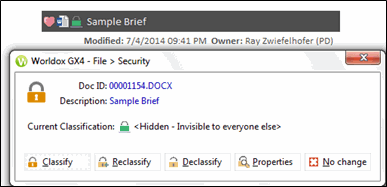
Click the Declassify button.
Worldox asks you to confirm this action in the File > Declassify > Security confirmation dialog. Click Yes.