Favorite Matters Category
Related Topics
Tree_Branches_in_the_Navigation_Panel_for_Favorite_Matters
Favorite_Matters_tab_on_the_File_Save_dialog
The Favorite Matters feature displays a list of matters you have accessed recently. This is similar to the Worldox Favorite Files feature except that folders are being tracked here rather than individual files. In fact your Favorite Matters list is derived from your recently accessed Favorite Files.
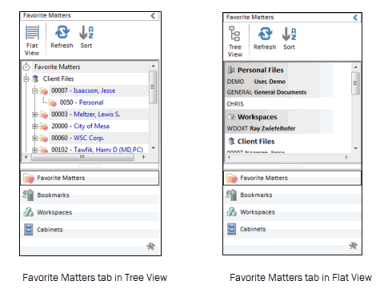
Folders appearing in the Favorite Matters category change over time, based on changes in your Favorite Files list.
In Worldox GX4, Microsoft Outlook drop folders now automatically correlate with Favorite Matters. You can easily move your incoming and outgoing emails to these folders in Outlook so that they are immediately saved into Worldox.

Note: Since GX4 uses Follow Me Favorites technology, if you are no longer accessing files in a Favorite Matter, that matter will automatically disappear from Microsoft Outlook’s drop folders over time.

Tree Branches in the Navigation Panel for Favorite Matters
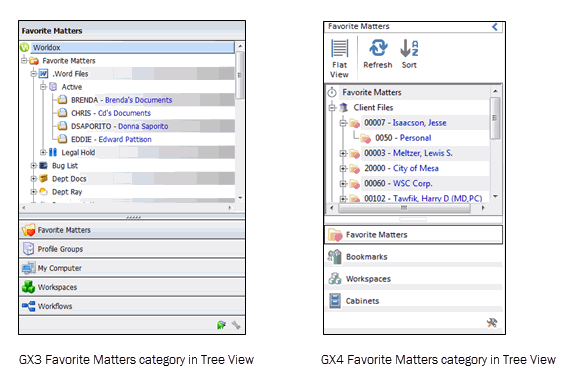
In previous versions of Worldox, the Favorite Matters tab in the Navigation Panel showed Worldox, Profile Group name, Active folder with sub-folders.
In Worldox GX4, the Favorite Matters tab no longer shows a Worldox line or Active Folder. It shows Cabinets (formerly Profile Groups) and sub-branches.
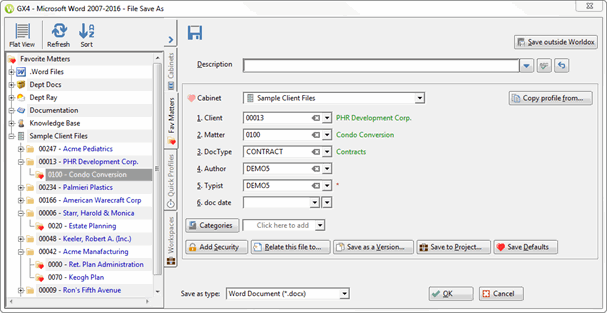
Favorite Matters tab on the File Save dialog
The File Save dialog also provides a Favorite Matters tab. When you save a new file into Worldox, you can double-click a Favorite Matters folder to automatically populate profile fields.
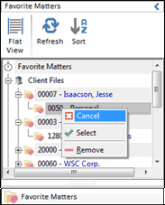
Remove from Favorites
You can remove entire Profile Group listings and folders listed in the Favorite Matters category. Just right-click the group or folder you want to remove and select Remove from the right-click menu.
Once a folder or group has been removed, that item stays removed from Favorite Matters until you again access any files in that location. At that point, those files are represented on one or more of your Favorite Files lists, and folders/groups in which those files reside will again appear in Favorite Matters.
Note: Since GX4 uses Follow Me Favorites technology, if you are no longer accessing files in a Favorite Matter, that matter will automatically disappear from Microsoft Outlook’s drop folders.