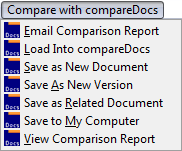
Use the Compare with compareDocs menu to view and output document comparison reports (part of the compareDocs module in the Productivity Suite.)
Note: Destinations shown below assume two files were selected for comparison. With fewer or more files selected, next steps are different.
Menu choice |
Description |
Email Comparison Report |
Runs the comparison, then opens the Email Documents dialog, where you select which documents and reports to attach to the email. |
Load Into compareDocs |
Opens the pdfDocs compareDocs window, where you can set up report and output options. |
Save as New Document |
Runs the comparison, then opens one or more Worldox windows to profile the document: • Depending on how profile groups and user access are set up at your site, you could see the Select Profile Group dialog first. • With profile group selected, fields fill into the File Save dialog. Here is where you describe and characterize the document. |
Save as New Version |
Runs the comparison, then opens one or more Worldox windows to profile the document: • Depending on how profile groups and user access are set up at your site, you could see the Select Profile Group dialog first. • With profile group selected, fields fill into the File Save dialog. Here is where you describe and characterize the document. |
Save as Related Document |
Runs the comparison, then opens one or more Worldox windows to profile the document: • Depending on how profile groups and user access are set up at your site, you could see the Select Profile Group dialog first. • With profile group selected, fields fill into the File Save dialog. Here is where you describe and characterize the document. |
Save to My Computer |
Runs the comparison, then opens the Windows File Save dialog, where you can save report files to your desktop or local drive. |
View Comparison Report |
Loads selected files into the pdfDocs compareDocs window, and runs the comparison as last set up in that window. Note: If you are not sure which reports you'll be viewing - or want to select other reports or report settings - select the first listing, Load into compareDocs, on this menu instead. |
