
Direct Access shortcuts to folders and files
Direct Access provides shortcuts to documents based on location, by identifying profile field values corresponding to the folders in which documents are stored. Direct Access is a convenient and fast way to access document folders without searching.
In a client\matter filing system, for example, documents would be stored based on specific Client and Matter values identified in document profiles. Using Direct Access, you enter or select Client and Matter codes to open the folders containing documents profiled with those codes.
Direct Access uses direct folder navigation, which is more efficient than searching. This means that you can reach files with Direct Access regardless of the status of the central index (the program that tracks Worldox-managed files and folders).
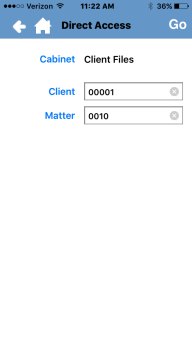
In the Worldox for iPhone main screen, select Direct Access. The Direct Access screen opens.

Tap the Cabinet field and then select a cabinet from the list.
That opens the first (or in some cases only) field table for that cabinet's linked fields - those corresponding to Worldox document storage folders.
Note: If you only have one cabinet at your Worldox site, you do not see the Direct Access dialog; instead, you go directly to the first (or only) field table for that cabinet's linked fields - those corresponding to Worldox document storage folders.
In the field table, select or enter a code value.
Note: See Working with fields for tips on how to enter or select values in different types of Worldox fields on the iPhone.
If this is the only profile field linked to a Worldox folder, you immediately see the file list of folder contents after selecting/entering the code. If not, you see the next linked field table. However many profile fields link to folders for the selected profile group, that is how many field table dialogs you see before Direct Access can retrieve the list.
Select Go.
The list of records in that file location appears.
