Worldox integrates with Fujitsu ScanSnap desktop scanners, so you can scan documents and store and manage them as fully text-searchable and instantly retrievable files.
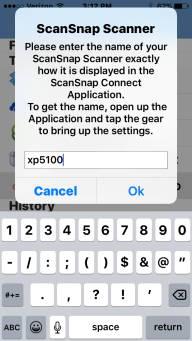
From the main screen, select Scan File with ScanSnap. If you added a ScanSnap printer to your iPhone, a pop-up message asks you to enter the name of the printer.
Enter the printer name and select OK.
A pop-up message confirms that the Worldox for iPhone app is connecting to the ScanSnap printer.
`
Once you are connected to the scanner, you can scan hard copies of documents and images into Worldox and save them with profile information.
