Using Direct Access
Direct Access is essentially a shortcut, a way to quickly reach folder contents without having to search or drill down through the Cabinet folder tree on the navigation panel. It allows navigation based on the folder-level Profile Fields of any Cabinet. In conjunction with Favorite Matters it allows quick access to all your recent work folders.
From the Worldox main window, click Direct Access on the toolbar, or select Direct Access from the List menu. That opens the Direct Access form.
You can re-select the cabinet if necessary, by clicking Cabinet. With another cabinet selected, the form reloads, and field choices most likely change.
Click field buttons to display field lookup tables, so you can select codes or values. Or, better yet type in codes if you know them or to look them up as you type.
Click OK. The folder you just identified opens, displaying files it contents.
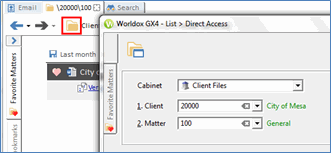
Note: When you are viewing files for a certain Client/Matter, you can click the folder icon above the file list to launch the Direct Access dialog.
